Table of Contents
Introduction
Cybercriminals are constantly changing their tactics to bypass traditional security measures. While passwords were once the primary target of attackers, today’s cybercriminals have shifted their attention toward something even more valuable—authenticated user sessions. Instead of spending time cracking passwords or bypassing Multi-Factor Authentication (MFA), attackers increasingly steal active browser sessions, allowing them to impersonate legitimate users instantly.
This growing trend has been fueled by the rapid rise of infostealer malware, one of the fastest-growing categories of cyber threats. Modern infostealers quietly infect a victim’s device, collect sensitive information, and upload it to cybercriminals within minutes. Along with usernames and passwords, these malware families now steal browser cookies, session tokens, authentication tokens, saved passwords, cryptocurrency wallets, autofill data, browser fingerprints, and other sensitive information that allows attackers to hijack online accounts without ever knowing the user’s password.
As organizations adopt cloud applications, remote work, Software-as-a-Service (SaaS), and passwordless authentication, session hijacking has become one of the biggest cybersecurity challenges facing businesses today.
What is Session Hijacking?
Session hijacking is a cyberattack where an attacker takes control of an already authenticated user session instead of stealing login credentials.
Whenever you log into websites like Gmail, Microsoft 365, Facebook, Amazon, or your company’s internal portal, the server creates a unique session token or authentication cookie. This token tells the website that you have already successfully logged in.
Rather than asking you to enter your password every time you click a new page, the browser sends this session token with every request.
An attacker who steals this token can often gain immediate access to your account—even if you use:
- Strong passwords
- Multi-Factor Authentication (MFA)
- Password managers
- Passwordless authentication
Because the website believes the attacker is simply continuing your existing session, it may not request another login or MFA challenge.
This makes session hijacking significantly more dangerous than traditional password theft.
Understanding Browser Sessions
Imagine entering an office building.
You show your identity card once at the reception.
Instead of asking for your ID every time you move between floors, the security guard gives you a visitor badge.
As long as you’re wearing that badge, everyone assumes you’ve already been verified.
A browser session works in exactly the same way.
The visitor badge is your session cookie.
If someone steals your badge, they can walk freely through the building without ever proving who they are.
What Is Infostealer Malware?
Infostealer malware is specifically designed to steal sensitive information from infected computers.
Unlike ransomware, which encrypts files, or spyware, which secretly monitors activity, infostealers focus on collecting valuable digital assets that criminals can quickly sell or exploit.
Modern infostealers target:
- Browser cookies
- Session tokens
- Saved passwords
- Credit card details
- Cryptocurrency wallets
- VPN credentials
- SSH keys
- FTP credentials
- Browser autofill information
- Email accounts
- Gaming accounts
- Cloud application tokens
Once collected, this information is sent to the attacker’s command-and-control infrastructure, where it may be sold on underground marketplaces or used in further attacks.
Common Infostealer Malware Families
Some of the most well-known infostealer families include:
- RedLine Stealer
- Lumma Stealer
- Vidar
- Raccoon Stealer
- StealC
- RisePro
- Atomic macOS Stealer (AMOS)
These malware families continuously evolve to evade antivirus software and target Windows, macOS, and, increasingly, Linux systems.
Why Infostealer Malware Is Growing So Rapidly
Cybercriminals no longer need advanced programming skills to launch attacks.
The underground cybercrime economy has commercialized malware through Malware-as-a-Service (MaaS). Criminals can rent infostealer malware, complete with customer support, regular updates, and dashboards, making sophisticated attacks accessible to less-skilled actors.
Several factors have accelerated the spread of infostealers:
Remote work has increased reliance on cloud-based applications and personal devices, expanding the attack surface. Browser-stored credentials and session cookies have become highly valuable because they often provide access to business systems, financial services, and collaboration platforms.
In addition, phishing campaigns, fake software downloads, cracked applications, malicious advertisements, and fraudulent browser extensions make it easier than ever to infect users without raising suspicion.
How Infostealers Enable Session Hijacking
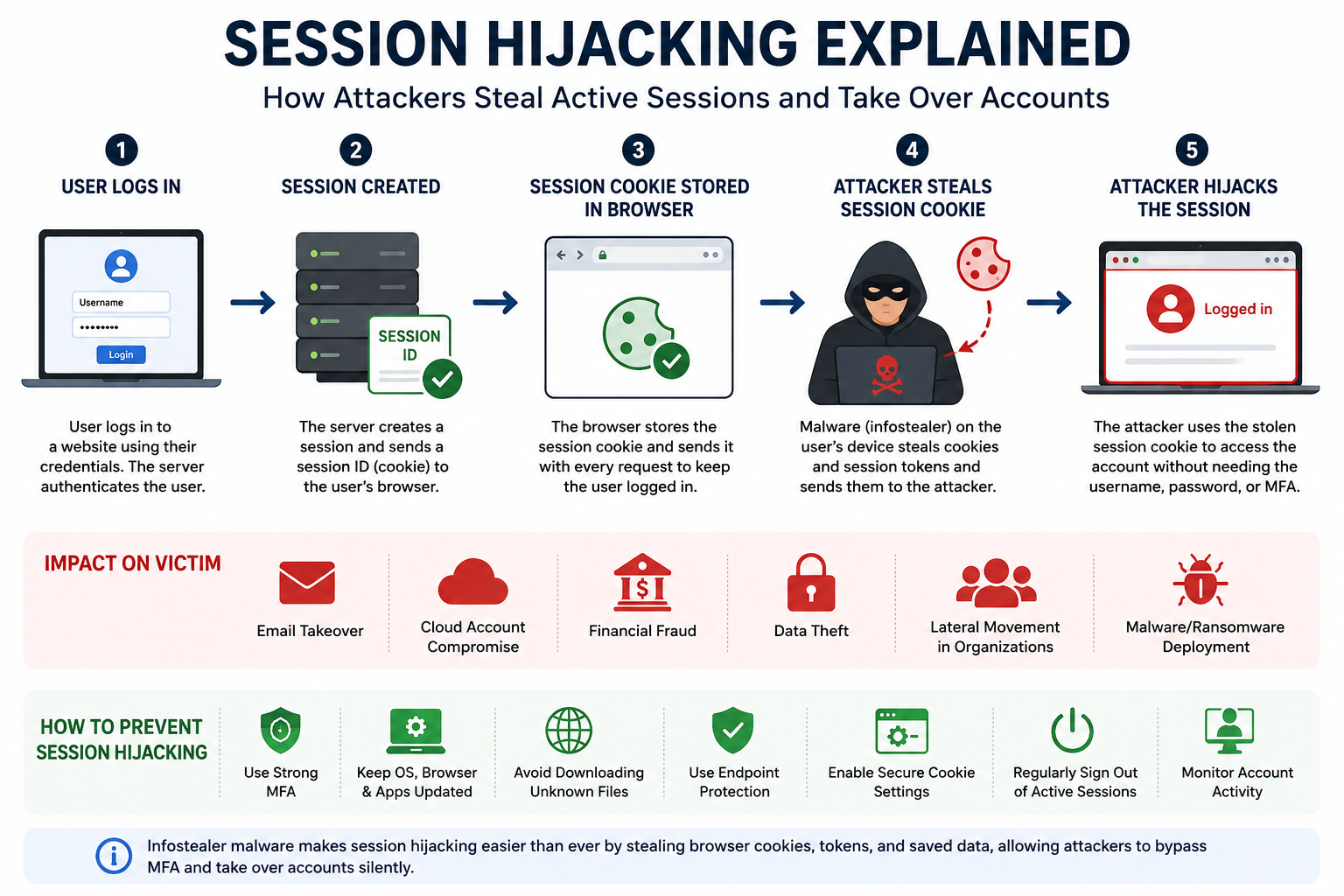
The attack typically follows a straightforward sequence.
A victim downloads a malicious file disguised as legitimate software, a game modification, a document, or a software update. Once executed, the malware silently searches the system for browser data, extracting cookies, session tokens, and authentication information stored by browsers such as Chrome, Edge, Firefox, and Brave.
The stolen data is immediately uploaded to the attacker’s server. Using specialized tools, the attacker imports the victim’s cookies into their own browser. If the targeted website accepts those cookies without additional verification, the attacker is logged in as the victim automatically.
From the website’s perspective, the attacker appears to be the same trusted user who authenticated earlier.
Why MFA Doesn’t Always Stop Session Hijacking
Many users assume that enabling Multi-Factor Authentication completely secures their accounts.
While MFA is highly effective against password theft, it does not always protect against stolen authenticated sessions.
Authentication typically occurs only during login. After successful authentication, websites rely on session cookies to maintain access. If attackers obtain those cookies after authentication has already taken place, they can bypass the login process entirely.
This explains why organizations with strong MFA deployments still experience account compromises through stolen sessions.
Industries Most at Risk
Nearly every industry can be affected, but some sectors are particularly attractive to attackers because of the value of their data and systems.
Financial institutions face risks involving banking sessions, payment platforms, and investment portals. Healthcare organizations manage sensitive patient records that attackers can exploit or sell. Technology companies hold valuable source code, cloud infrastructure, and intellectual property. Government agencies and educational institutions also remain frequent targets due to the large number of user accounts and sensitive information they manage.
Business Impact of Session Hijacking
A successful session hijacking attack can lead to severe consequences.
Attackers may access confidential emails, steal customer information, manipulate financial transactions, deploy ransomware, or move laterally through corporate networks. The resulting downtime, regulatory penalties, reputational damage, and incident response costs can be significant.
Because the attacker is using a legitimate authenticated session, malicious activity often blends in with normal user behavior, making detection more difficult.
Detecting Session Hijacking
Organizations can improve detection by monitoring for unusual behavior, such as logins from different geographic locations within a short time, impossible travel events, sudden changes in browser characteristics, abnormal access patterns, or the use of previously unseen devices.
Behavioral analytics, endpoint detection and response (EDR), and identity protection solutions can help identify compromised sessions before major damage occurs.
Best Practices to Protect Against Infostealers and Session Hijacking
Defending against these attacks requires more than strong passwords. Organizations should adopt a layered security strategy that includes endpoint protection, timely software updates, phishing awareness training, browser hardening, secure session management, and continuous monitoring of user activity.
Users should avoid downloading software from untrusted sources, keep browsers and operating systems updated, use reputable antivirus or EDR solutions, and regularly review active sessions on important online accounts. Administrators should implement shorter session lifetimes where practical, re-authenticate users for sensitive actions, and revoke sessions immediately after suspicious activity is detected.
The Future of Session Hijacking
As cloud services, SaaS platforms, remote work, and AI-assisted cybercrime continue to expand, session hijacking is likely to become even more prevalent. Attackers increasingly recognize that stealing authenticated sessions is often faster and more reliable than attempting to crack passwords.
Organizations are responding with stronger identity verification, device trust, continuous authentication, and zero-trust security models. Even so, defenders must remain vigilant because infostealer malware continues to evolve rapidly, targeting the very mechanisms designed to improve user convenience.
Conclusion
The rise of infostealer malware has transformed session hijacking into one of today’s most significant cybersecurity threats. By stealing browser cookies and authentication tokens, attackers can bypass traditional login defenses and gain immediate access to sensitive accounts.
Protecting against these attacks requires a combination of secure endpoints, user education, robust identity management, continuous monitoring, and modern security architectures. Organizations that understand how session hijacking works and invest in proactive defenses will be better equipped to safeguard their users, data, and critical systems in an increasingly hostile digital environment.
FAQs
Can session hijacking happen even if I use MFA?
Yes. If an attacker steals a valid session cookie after you’ve logged in, they may be able to access your account without needing your password or MFA code.
Which browsers are commonly targeted by infostealers?
Popular browsers such as Google Chrome, Microsoft Edge, Mozilla Firefox, Brave, and Opera are common targets because they store cookies, saved credentials, and session information.
Are individuals at risk, or only businesses?
Both. Individuals can lose access to personal email, banking, and social media accounts, while businesses face risks such as data breaches, financial loss, and ransomware deployment.
How can I reduce my risk?
Use trusted software sources, keep systems updated, enable MFA, avoid suspicious downloads, use endpoint protection, and regularly sign out of important accounts on shared or untrusted devices.