
Introduction
The rise of remote and hybrid work has fundamentally reshaped the modern workplace. Millions of professionals now access sensitive corporate repositories and production systems from the comfort of their homes. On any given Tuesday, an employee’s home network might simultaneously manage a corporate laptop, a corporate smartphone, a smart speaker, wireless security cameras, network printers, and a handful of smart appliances.
While this hyper-connected lifestyle has improved work flexibility and daily convenience, it has introduced a massive cybersecurity blind spot: the intersection of vulnerable consumer Smart Home technology—the Internet of Things (IoT)—with corporate assets.
Unlike enterprise-grade workstations, smart home gadgets are engineered primarily for plug-and-play convenience rather than robust security. Voice assistants, smart TVs, Wi-Fi cameras, and connected thermostats frequently run outdated firmware, carry hardcoded default passwords, and receive minimal long-term support. When these unmanaged devices share an open local network with work computers, they become low-hanging fruit for threat actors looking to pivot onto corporate servers. Securing these devices is no longer just a minor IT advisory; it is a structural pillar of modern corporate infrastructure security. To understand why this overlap is so critical, see our essential overview on What Is Cybersecurity? Why Is Cybersecurity Important?.
Understanding the Security Risk: The Threat of Lateral Movement
A typical residential network is built completely differently from a professionally monitored corporate environment. In a standard corporate office, data flows behind multi-layered firewalls, intrusion detection systems, rigorous endpoint tracking, and strict administrative access policies. At home, however, dozens of untrusted devices connect to the exact same Wi-Fi router without a centralized management console to spot anomalies.
When an enterprise laptop shares an unprotected local subnet with an insecure consumer device, it becomes exposed to lateral movement:
[Threat Actor on Public Web]
             │
             ▼ (Exploits Vulnerable Firmware / Default Password)
   [Smart Home IoT Device]
             │
             ▼ (Moves Laterally Across the Unsegmented Home Subnet)
     [Corporate Laptop] ──> [Secure Enterprise Core Network Access Gateway]
Cybercriminals do not necessarily need to breach your corporate laptop’s specialized antivirus software directly from the internet. Instead, they scan the web for exposed, poorly defended consumer IoT hardware. Once they compromise a single device on your home network—like an unpatched smart doorbell—they use it as an internal stepping stone to run local network scans, sniff internal traffic, or launch man-in-the-middle attacks against your active work computer.
Technical Security Environment: Corporate vs. Home Office Networks
| Infrastructure Element | Corporate Managed Environment | Standard Home Office Network |
| Network Visibility | 24/7 SIEM monitoring, behavioral analysis, and logged traffic. | Zero internal traffic logging or anomalous device visibility. |
| Device Security Posture | Enforced endpoint detection (EDR), regular patches, and MDM locks. | Outdated firmware, zero local antivirus, and open listening ports. |
| Access Control | Micro-segmentation, role-based access control, and strict VLANs. | Flat network setup where every connected device can talk to another. |
| Default Settings | Hardened configurations; generic services disabled out of the box. | Shipped with public factory passwords and universal plug-and-play (UPnP). |
Why Smart Devices (IoT) Are Attractive Targets
Let’s be frank: consumer device manufacturers prioritize low production costs and zero-friction user setups over enterprise-grade data protection. As a result, the average consumer smart device is a collection of common security architectural flaws:
Hardcoded Administrative Credentials: Many devices are pre-configured with generic, well-documented usernames and passwords (e.g.,
admin/password) that users rarely change.Static Software Ecosystems: A large percentage of low-cost IoT gadgets completely lack an automated security update mechanism, requiring manual patches that the average consumer is unaware of.
Insecure Default Communication: Devices frequently broadcast cleartext data across local airwaves or leave unnecessary network ports wide open to facilitate easy smartphone pairings.
Minimal Logging Capability: If an IoT device is compromised, it generates no local alerts or audit records, allowing malware or botnet protocols to run silently for months.
Operational Strategies to Protect Your Home Workspace
1. Implement Strict Network Segmentation
The single most effective defense against IoT security risks is structural network segmentation. Instead of running a single “flat” network where your smart refrigerator sits on the same subnet as your financial accounting database, you must divide your home network into distinct behavioral compartments:
Corporate Zone: Dedicated exclusively to work-issued laptops, business phones, and secure storage vaults.
IoT & Smart Home Zone: Reserved for streaming sticks, smart lights, home security cameras, and voice assistants.
Personal Guest Zone: Allotted to tablets, gaming consoles, and personal smartphones brought by visitors.
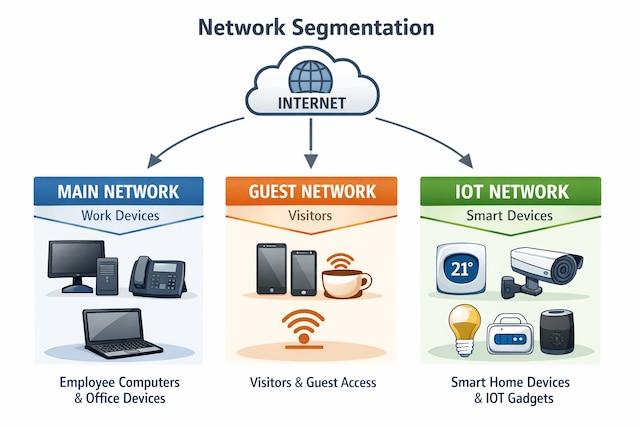
Most modern consumer routers natively support a Guest Network feature or isolated SSIDs. By placing all your smart home tech on an isolated guest network and enabling “Device Isolation,” you ensure that even if a smart camera is fully compromised, the hacker cannot discover or communicate with your work computer. This design closely mirrors the protective benefits outlined in our breakdown of What Is Zero Trust Security and Why Modern Companies Need It.
2. Harden Your Wireless Network Configuration
Your local Wi-Fi router is the literal gatekeeper of your professional and personal data. Leaving it running on factory settings leaves your remote office open to intrusion.
The Baseline Hardening Checklist:
Upgrade your wireless security protocol to WPA3 (or WPA2 AES if older hardware requires it). Never use outdated WEP or WPA configurations.
Immediately replace the default factory admin password on your router’s web console.
Disable Universal Plug and Play (UPnP) and remote management options to stop external attackers from opening inbound router channels.
Failing to secure this initial entry point is one of the most Common Cybersecurity Mistakes People Make Every Day.
3. Maintain Continuous Firmware Hygiene
Firmware updates are essentially critical security patches delivered to fixed hardware. When a manufacturer discovers an exploit that allows attackers to hijack a device remotely, they issue a patch to seal the vulnerability. Remote workers must log into their smart home apps periodically to confirm that all automatic updates are active, and completely retire legacy gadgets that are no longer supported by the manufacturer.
4. Deploy Strong Authentication Frameworks
Every application, cloud portal, or administrative console tied to your home office must be locked behind an independent, unique passphrase. Avoid using repetitive baseline phrases such as 12345678 or admin123.
To manage a highly complex credential footprint easily, implement a certified password manager. More importantly, turn on Multi-Factor Authentication (MFA) everywhere it is supported. To understand why this secondary token is completely non-negotiable for identity verification, check out our guide on What Is Two-Factor Authentication and Why You Should Use It.
5. Separate Corporate and Personal Workflows
It is tempting to check a personal social media feed, play an online game, or insert an unverified USB flash drive into a corporate machine while working from home. However, blending personal workflows with enterprise hardware expands your exposure to malicious drive-by downloads and phishing landing pages. Use company-issued devices strictly for business tasks, avoid installing unvetted software, and completely isolate files between your personal and corporate computing environments.
6. Mandate Secure Connections via Enterprise VPNs
A Virtual Private Network (VPN) encrypts all data packets leaving your laptop before they cross your home router or the broader internet. Even if a local smart device is compromised and actively monitoring local wireless traffic, it will only see an unreadable stream of heavily encrypted data. A robust corporate VPN acts as an indispensable, continuous protective shield for home network traffic.
The Human Factor & The Future of Smart Home Defenses
As we look toward emerging operational landscapes, the line separating personal home convenience from corporate network data will continue to blur. Cybercriminals are using increasingly sophisticated automation routines to discover and attack residential targets, cementing these home office threats onto the register of the Top Cybersecurity Threats Businesses Should Prepare for in 2026.
Technology alone cannot solve these distributed vulnerabilities. True corporate safety depends heavily on continuous personal awareness and proactive security hygiene. Organizations must actively train remote professionals to recognize suspicious connection requests, audit local Wi-Fi environments, and report anomalies to IT support staff immediately.
Conclusion
Smart home technology has redefined modern living, providing unprecedented convenience, automation, and comfort. However, when these consumer devices share an unsegmented home network with enterprise equipment, they introduce real architectural risks to corporate data security.
By taking control of your local environment—implementing guest network isolation, enforcing complex passwords, keeping IoT firmware updated, and relying on corporate encryption tools—you can easily eliminate these structural exposure vectors. Securing the home office is an active, ongoing process that protects your personal identity and your company’s assets alike.
Frequently Asked Questions (FAQs)
1. Why exactly do smart home devices pose a risk to my corporate laptop?
Smart home IoT devices are rarely designed with enterprise security features. They often run on outdated software with known vulnerabilities or use default passwords. If an attacker gains control of a weak device on your home Wi-Fi, they can use that compromised foothold to scan your network and launch lateral attacks against your work laptop.
2. How does using a router’s Guest Network help secure my remote workspace?
A Guest Network creates a completely separate virtual network zone. When you place smart TVs, voice assistants, and connected cameras on the Guest Network and leave your work computer on the main network, the router blocks data traffic from passing between the two subnets. A compromised camera remains isolated from your corporate workspace.
3. What are the most critical settings I should change on my home Wi-Fi router today?
You should immediately change the manufacturer’s default administrative password, switch your wireless security protocol to WPA3 or WPA2 (AES), disable Universal Plug and Play (UPnP), and turn off any remote management options that allow configuration from outside your home.
4. Is it safe to use my work-issued computer for personal online shopping or entertainment?
No. Restricting your corporate laptop strictly to authorized work activities minimizes your risk exposure to malicious ads, phishing links, and compromised third-party software downloads that could track your activity or jeopardize enterprise infrastructure.
5. What is the best long-term approach to maintaining home office security?
The most resilient long-term approach combines a segmented network layout with strict identity management (MFA and unique passwords), automated firmware tracking, continuous VPN usage, and a healthy daily habit of digital vigilance.